Script API
Your bundle code runs inside an isolated sandbox hosted within either the server or game client. Whichever realm executes your component changes what kind of APIs you have access to. Both realms share a subset of APIs and generic types, but the majority is realm specific.
Scripting Docs
See our specialized scripting docs at scripting.replay.re for all the APIs you can use in either realm. Custom extensions that are not part of the base game are marked with flairs
Nothing else is reachable from bundle code. The sandbox can only access what these APIs expose, plus the IO channels described in Bundle IO.
Registration happens during App.Start
Commands, hooks and event handlers are all callbacks. They tell the script host
"call my code when X happens". The script host only accepts registrations during
the initial execution of your bundle, which is the single App.Start()
call it makes when activating you. Once that call returns, the script host no
longer grants access to its registration state, and code that tries to
register from inside a later callback (a command body, an event handler)
cannot.
Info
Register all callbacks in App.Start(). Do not defer the registration.
The things you register are then active for the lifetime of the bundle and are
cleaned up automatically when the bundle stops
When a script crashes
An unhandled exception, or a script that fails to load or throws in App.Start(),
stops the bundle as a whole. The client and server halves and the assets of a bundle
usually depend on each other, so none of them keep running on their own:
- Server script: the server stops the bundle, exactly like the
stopconsole command. Every client unloads it too, including its assets and UI.startruns it again - Client script: the bundle is unloaded on that client only, including its assets and UI. The server and all other players are unaffected, and the server is not told. A crash on one machine, or a player tampering with their copy, cannot take the bundle down for everyone. The bundle comes back on that client when the server restarts it or the player reconnects
Console commands
re.Con.RegisterCommand makes a command available in the host's console:
re.Con.RegisterCommand(
    "setmode",
    args =>
    {
        // args are the space-split tokens after the command name
        if (args.Length == 0)
        {
            Console.WriteLine("Usage: setmode <mode_id>");
            return;
        }
        // ...
    }
);
- Command names are unique per realm, across all bundles. Registering a name that is already taken fails and is logged
- A server-realm command runs when typed into the server console. A client-realm command runs when typed into the game console, and can also be attached to a key (below)
- Command handlers always take the argument array, even when the body does
not use it. A body that waits uses an
asynclambda, which binds to the same signature (see Scheduling)
Keybinds (client realm)
On the client, re.Con.RegisterCommandWithKeyBind registers the command
and binds a key to it in one step:
re.Con.RegisterCommandWithKeyBind(
    "open-chat-window",
    args =>
    {
        // open the chat UI, capture input, ...
    },
    EInputKey.IK_Enter,
    "Open Chat Window"
);
- The key parameter is an
EInputKeyvalue (the constants are documented in the Input Keys reference) - The binding shows up in the player's keybind settings under your bundle, so players can rebind it. The description string is what they see
- Binding a key that is already bound fails, so does registering a command name that is taken
Hooks (client realm)
Hooks let client code intercept a game function. Whenever the game calls that function, your handler runs instead, and it decides whether the original call happens.
re.Hooks.PlaceVoid(
    "PlayerPuppet",
    "OnDetach",
    (PlayerPuppet_OnDetach x) =>
    {
        // x carries the function's parameters (here x.self)
        re.Hooks.CallOriginalVoid(); // let the original run
    }
);

[Msgpack.Gen]
public readonly partial record struct PlayerPuppet_OnDetach(
    PlayerPuppet self
);
- The class and function names identify a specific game function. We have an automatic generator for creating hook templates in the client API reference. Press the 'Hook' button behind a function you would like to intercept
- The handler's argument type (here
PlayerPuppet_OnDetach) is the serializer record for that function and carries its parameters. It requires aMsgpack.Genattribute for serialization - To replace a result, return it directly and skip the original call. To
pass through, call
re.Hooks.CallOriginal<TOut>()(or theVoidvariant) and return its result - To change what the original receives, call
re.Hooks.CallOriginalWith<TOut, THandler>(…)(orCallOriginalWithVoid(…)), passing the handler's record with the values you want overridden. Fields left asnullare passed through unchanged, so only overriding fields have to be set explicitly - Hooks support hooking script implemented or native game functions
Modifying parameters passed to game functions is done via CallOriginalWith<TOut, THandler>(...) / CallOriginalWithVoid(…).
Fields left as null are passed through unchanged, so only overriding fields have to be set explicitly.
Example
A convenient way to only change one parameter is to use the
with expression.
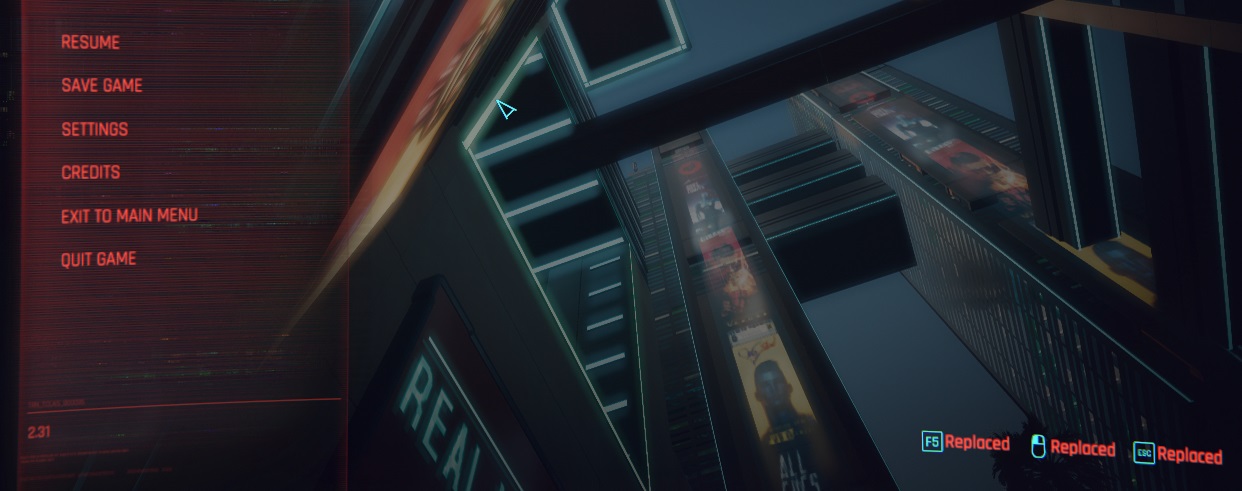
This example will replace certain button hints with a "Replaced" text:
re.Hooks.PlaceVoid(
    "ButtonHints",
    "AddButtonHint;EInputKeyscript_ref<String>",
    (ButtonHints_AddButtonHint x) =>
    {
        Console.WriteLine($"Value before replacing:  {x.label}");
        re.Hooks.CallOriginalWithVoid(x with { label = "Replaced" });
    }
);

re.Hooks.PlaceVoid(
    "ButtonHints",
    "AddButtonHint;CNamescript_ref<String>",
    (ButtonHints_AddButtonHint2 x) =>
    {
        Console.WriteLine($"Value before replacing  {x.label}");
        re.Hooks.CallOriginalWithVoid(x with { label = "Replaced" });
    }
);

[Msgpack.Gen]
public readonly partial record struct ButtonHints_AddButtonHint(
    ButtonHints self,
    EInputKey icon,
    string label
);

[Msgpack.Gen]
public readonly partial record struct ButtonHints_AddButtonHint2(
    ButtonHints self,
    CName action,
    string label
);
Result:
Events
Events come in two variants. Local events stay inside one realm, net events cross between a client realm and the server realm.
Local events
re.Events.On(handler) subscribes to a named event in the current realm.
re.Events.Emit(payload) emits one. Every bundle in the realm with a
matching handler receives it. The payload type is declared by you, except
for the system events the host itself raises. These have a fixed signature
and can be found in the re.Events namespace.
The payload type also names the event. re.Events.On reads the name from
the type of the handler's parameter, re.Events.Emit from the type of the
argument, so both sides agree without a hand-written string:
public record ChatMessage(string author, string contents);

// subscribe to the local event
re.Events.On((ChatMessage x) => Console.WriteLine($"{x.author}: {x.contents}"));

// emit the local event
re.Events.Emit(new ChatMessage("Alex", "hello"));
The payload does not need an attribute (opposed to hook records). A plain record declaration is enough (see Payload records).
The event functions also have overloads that accept an explicit name provided as a string if you
prefer to have explicit control over naming: re.Events.On("chat:message", (ChatMessage x) => …) and
re.Events.Emit("chat:message", payload).
The server realm raises these system events:
| Event | Raised when | Payload |
|---|---|---|
ClientConnecting |
A client requests to join. Decide by accepting or rejecting the connection | ClientConnecting( |
ClientConnected |
A client finished joining | ClientConnected( |
ClientReadyForObserver |
A joined client needs its in-game entity | ClientReadyForObserver( |
ClientObserverGenderChangeRequested |
A client is asking to change its controlled puppets gender. This involves creating a new one and swapping it | ClientObserverGenderChangeRequested( |
ClientObserverEntityChanged |
A client's observed (controlled) entity was replaced, for example after a respawn | ClientObserverEntityChanged( |
ClientDisconnecting |
A client is leaving | ClientDisconnecting( |
UgcBundleStartedUgcBundleStopping |
Any bundle on the realm started or stopped | UgcBundleStarted(name)UgcBundleStopping(name) |
The client realm raises these system events:
| Event | Raised when | Payload |
|---|---|---|
EntityCreating |
A game entity starts spawning in the client realm (its spawn request was queued) | EntityCreating(gameid) |
EntityCreated |
A game entity finished spawning in the client realm | EntityCreated( |
EntityAttached |
A game entity finished attaching to the world | EntityAttached( |
EntityDetaching |
A game entity is about to detach from the world | EntityDetaching( |
EntityDisposed |
A game entity was disposed and removed from the client realm | EntityDisposed( |
UgcBundleStartedUgcBundleStopping |
Any bundle on the realm started or stopped | UgcBundleStarted(name)UgcBundleStopping(name) |
re.Events.On(
    (re.ClientConnecting x) =>
    {
        var status = re.GameClientRegistry.AcceptConnection(x.connection);
        Console.WriteLine($"connect {x.username}: {status}");
    }
);

re.Events.On((re.EntityDisposed x) => Console.WriteLine($"disposed {x.netid}"));
Payload record parameters
System event payloads are records in the re namespace (the prefix is
omitted in the tables above). Their parameters mean:
| Parameter | Meaning |
|---|---|
connection |
Handle of the pending connection (uint). Approve it with re.GameClientRegistry.AcceptConnection. Without approval the connection attempt times out and is dropped (This does not apply if no bundle handles the event) |
identity |
Identity token presented by the connecting client (re.ClientIdentity, 32 bytes) |
username, userid |
Display name and user id carried with the connection (string, ulong) |
id |
The client's id in the session (re.ClientId). Use it to target net events and registry calls such as DisconnectClient |
gameid |
The entity's id in the client sided game world (ent.EntityID). These are client specific and not unique! |
netid |
The unique entity's networked id (re.EntityId). Invalid when the entity is not networked |
previous, current |
A client's observed entity before and after the change (re.EntityId). previous is invalid for the client's first observer entity |
gender |
The observer PlayerPuppet's gender (re.CName) |
name |
The name of the bundle that started or stopped (string) |
The server host applies defaults when nothing handles an event: an
unhandled ClientConnecting accepts the connection, and an unhandled
ClientReadyForObserver gives the client a default humanoid entity. Your
gamemode overrides those events to implement its own connection rules and
spawning. How to do that safely is the topic of
The Networking Model.
Note
Currently ClientReadyForObserver events fire based on the clients loading stage. This means,
that a client that triggers a fast-travel / teleport loading screen will also raise the event
again, even though it has a valid PlayerPuppet and does not need a new one
Filter requests in your event handler by checking if the current observer entity is still valid before handing out new ones
Net events
re.Events.OnNet / re.Events.EmitNet send messages between a client
realm and the server realm. As with local events, the payload type names
the event, so both sides agree on the name without a string.
- Client to server: The client calls
re.Events.EmitNet(payload). The server receives it in anOnNethandler and gets the sender'sClientIdalongside the payload - Server to client: the server sends with
re.Events.EmitNetBroadcast(every client) orre.Events.EmitNetTargeted(one client or a list). Clients receive the payload without a sender id
re.Events.OnNet(
    (re.ClientId sender, ChatMessage message) =>
    {
        // the server sees who sent it, clients never do
        re.Events.EmitNetBroadcast(message);
    }
);
Both realms need the same payload type and therefore the same event name,
so declare it in the shared project that is compiled into both blobs. A
type declared in sh gives both sides the identical name and serializer
without repeating the declaration.
Warning
Any data coming from clients is claimed data, not verified game state. Validate it before acting on it. See the networking model for what this means in practice
The only exception is the ClientId received in a server OnNet handler
It is guranteed that this id belongs to the message author
Event names
Without an attribute, the event name is derived from the payload type at compile time. The namespace is dropped, containing classes are kept:
| Payload type | Event name |
|---|---|
ChatMessage |
ChatMessage |
types.chat.ChatMessage |
ChatMessage |
Chat.Message, nested in a class named Chat |
Chat.Message |
Chat.Inner.Message |
Chat.Inner.Message |
[re.Event("chat:message-sent")]
public record ChatMessage(string author, string contents);

[re.ShortEventName]
public record Ping(string text);

public static class Chat
{
    [re.ShortEventName]
    public record Envelope(string text);
}
[re.Event("...")]uses the string as-is. This is how names that are not valid C# type names are written, such as thechat:message-sentstyle the example bundles use[re.ShortEventName]drops every containing class, soChat.MessagebecomesMessage. If you apply the attribute to a class, it applies to every type nested inside it- Event names have to be unique per realm. With
[re.ShortEventName], two types with the same simple name in different nested classes end up with the same event name, so either keep such types in separate realms or give them distinct names
Note
Names are resolved while compiling. Two bundles that exchange events must declare the payload type under the same name, or use the string overloads
Payload records
Any record can carry an event payload. Declaring it is enough:
public record ChatMessage(string author, string contents);

public record ChatEnvelope(ChatMessage message, int version, string? channel);
- Primitive properties,
string, enums, arrays,Dictionary<TKey, TValue>and further records work, including nested and nullable ones [Msgpack.Gen]withpartialis currently still required for hooks and scripting state- Only records are discovered. A plain class or a non-record struct has no serializer even when it is passed to an event, which compiles but throws at runtime when the event is handled or emitted
- A property that cannot be serialized will cause a compiler error that looks
roughly like:
msgpack: ChatEnvelope.tags has type System.Collections.Generic.List<string>, which has no msgpack serializer
Handlers
A handler is a standard delegate, so a lambda, a method group or a delegate variable all work. A lambda gets the payload type from its parameter, so nothing has to be written out:
re.Events.On((ChatMessage x) => Console.WriteLine($"{x.author}: {x.contents}"));

re.Events.On(
    async (ChatMessage x) =>
    {
        await Future.Sleep(500);
        Console.WriteLine(x.contents);
    }
);
Methods can be passed too, this is especially useful for writing complex handler setups in a structured way. C# does not infer a type argument from a method group, so you have to specify the payload type in this case:
public static class ChatHandlers
{
    public static void OnMessage(ChatMessage x)
    {
        Console.WriteLine($"{x.author}: {x.contents}");
    }

    public static async Future OnMessageDelayed(ChatMessage x)
    {
        await Future.Sleep(500);
        Console.WriteLine(x.contents);
    }
}

re.Events.On<ChatMessage>(ChatHandlers.OnMessage);
re.Events.On<ChatMessage>(ChatHandlers.OnMessageDelayed);
A struct instance works the same way, re.Events.On<ChatMessage>(handlers.OnMessage).
A delegate doesn't need explicit specification of the type, it works as is:
Action<ChatMessage> handler = ChatHandlers.OnMessage;

re.Events.On(handler);
re.Events.On("ChatMessage", handler);
The same three forms exist for net events, but do note that on the server the handler epexts
the sender re.ClientId as the first argument (re.Events.OnNet<ChatMessage>((re.ClientId sender,
ChatMessage x) => …)).
Exports (calling other bundles)
Exports let one bundle call a function in another bundle in the same realm and get a result back. Use them to build shared services, like an economy or permissions bundle, that other bundles query directly.
re.Exports.Add(name, func) publishes a function under your bundle's name.
re.Exports.Call<TOut, TIn>(bundle, name, input) calls it from any other bundle and
returns its result. re.Exports.CallVoid(bundle, name, input) does the same
and discards the result.
re.Exports.Add(
    "GetBalance",
    (BalanceRequest req) => new BalanceResponse(Balances.GetValueOrDefault(req.userid))
);
var balance = re.Exports.Call<BalanceResponse, BalanceRequest>(
    "economy",
    "GetBalance",
    new BalanceRequest(userid)
);
[Msgpack.Gen]
public readonly partial record struct BalanceRequest(ulong userid);

[Msgpack.Gen]
public readonly partial record struct BalanceResponse(ulong balance);
- The bundle name is the bundle's folder name (see Bundle Config).
The export is registered under the name of the bundle that called
Add - Exports are per realm. A server bundle can only call server-realm exports, a client bundle only client-realm exports of bundles on the same client. To cross realms, use net events
Addis a registration, so it must happen inApp.Start().Callcan be used at any time- Input and output are serialized with MessagePack and must be
Msgpack.ISerde<T>types. Like hooks and scripting state, that currently still means records declared with[Msgpack.Gen]andpartial. Primitives such asulongorstringmust be wrapped in a record. Both bundles need a matching record definition Callis synchronous. The exporting bundle runs the function right away andCallreturns its result. To call anasyncexport, or to avoid blocking, useCallAsyncCallcannot call into a bundle that is still running and waiting for the current call to return, such as your own bundle or the bundle that called you. It throwsExportExceptioninstead. UseCallAsyncfor those- Names are unique per bundle. Adding the same name twice keeps the first function and logs a warning
- Exports are removed when their bundle stops
Call and CallVoid throw re.ExportException when the call fails, the
export does not exist, its bundle is not running or is stopping or the
exported function threw. Bundles might start, stop or restart at any time, so its
recommended to handle the exception if you are not absolutely sure about the lifetime
of the bundle you are trying to call into:
try
{
    var balance = re.Exports.Call<BalanceResponse, BalanceRequest>(
        "economy",
        "GetBalance",
        new BalanceRequest(userid)
    );
}
catch (re.ExportException e)
{
    Console.WriteLine(e.Message); // e.g. "Could not find export 'GetBalance' in bundle 'economy'"
}
An exception thrown inside an exported function does not stop the exporting
bundle. It is passed back to the caller, whose ExportException then contains the
original exception type, message and the stack. On clients the stack is only included
when the exporting bundle sets backtrace = true:
re.ExportException: Export 'GetBalance' in bundle 'economy' threw System.Collections.Generic.KeyNotFoundException: no account '42'
   at Accounts.Find(UInt64)
   at App.<>c.<Start>b__0_0(BalanceRequest)
Expected failures belong in the output record
Exceptions are for bugs and are not free. If "no account" is an expected answer, return it in
your output record (for example a found field) so callers do not need a
try/catch for everyday cases
Async exports
An exported function can be async. Pass an async lambda to re.Exports.Add
and it can await other work, such as Future.Sleep, an HTTP request or another
bundle's export, before it returns:
re.Exports.Add(
    "GetBalance",
    async (BalanceRequest req) =>
    {
        var balance = await LoadBalance(req.userid);
        return new BalanceResponse(balance);
    }
);
re.Exports.CallAsync<TOut, TIn>(bundle, name, input) calls an export and
returns a Future<TOut> to await:
re.Events.OnNet(
    "show-balance",
    async (re.ClientId client) =>
    {
        try
        {
            var balance = await re.Exports.CallAsync<BalanceResponse, BalanceRequest>(
                "economy",
                "GetBalance",
                new BalanceRequest(userid)
            );
            // ...
        }
        catch (re.ExportException e)
        {
            Console.WriteLine(e.Message);
        }
    }
);
CallAsyncworks with both sync and async exports.Callonly works with sync exports, and throwsExportExceptionfor an async one- The request are processed and the result are delivered on the realm tick,
not directly inside the
CallAsynccall. A sync export should answers within the same tick, an async one when its function finishes - Every failure is passed in through the
Future. Awaiting it throwsre.ExportExceptionwhen the export does not exist, its bundle is not running, the function threw, or the bundle stops before the function finishes - If the calling bundle stops first, the result is dropped
- A call that gets no result within 30 seconds throws
re.ExportException. The exported function keeps running and its side effects might still happen, only its result is dropped.
Note
Inside exports, give HTTP requests a timeout below 30 seconds, so the export can still answer even if the web request timed out
Scripting state (key-value storage)
Per-entity key-value storage has its own page: Scripting State.
HTTP requests
HTTP requests have their own page: HTTP Requests.
Databases
Databases have their own page: Databases.
Voice chat
Voice range, direct connections, speakers and mics, and voice effects have their own page: Voice Chat.
Spawning entities (server realm)
Spawning entities has its own page: Spawning Entities.
Vehicle tuning (client realm)
Vehicle tuning has its own page: Vehicle Tuning.
Scheduling
Your handlers run synchronously while the script host executes the call that
reached them. To pause or space out work, the framework provides a Future
type with async/await support.
Any API that accepts a handler also takes an async one:
re.Con.RegisterCommand(
    "announce",
    async args =>
    {
        await Future.Sleep(2000); // resume roughly 2 seconds later
        re.Events.EmitNetBroadcast(new ChatMessage("server", args[0]));
    }
);

re.Events.OnNet(
    async (re.ClientId sender, ChatMessage message) =>
    {
        await Future.Sleep(500);
        Console.WriteLine($"{sender}: {message.contents}");
    }
);
re.Events.OnNet(
    async (ChatMessage message) =>
    {
        await Future.Sleep(500);
        Console.WriteLine(message.contents);
    }
);
await Future.Yield()pauses until the next scheduled runawait Future.Sleep(ms)resumes after the given delay in millisecondsFuture.WhenAll(a, b, …)waits for several futures, and the generic variant returns their results in order- Do not block! A handler that spins without returning stalls script execution.
Use the
Futurehelpers instead of busy loops
An exception thrown by an async handler is not swallowed. It "surfaces" in
the registration call itself when it throws before the first await or in
the tick that resumes work after the delay/Sleep is completed.
The host treats it like an exception from a "normal" synchronous handler and
unloads the bundle.
A method that returns Future can be started by hand where nothing awaits
it. Call Forget() on the returned future so its exception is not lost:
static async Future AnnounceLater(string text)
{
    await Future.Sleep(1000);
    Console.WriteLine(text);
}

AnnounceLater("hello").Forget();
Danger
An infinite loop without a proper await Future.Yield() or await Future.Sleep(ms) will cause a deadlock in the script host
To ensure best performance, make sure to use the longest sleep delays possible for the work you are planning to do