Interactions
An interaction puts the game's own interaction prompts on any entity or any point in the world, with your text, and calls your code when the player picks a choice. It uses the same prompts the game uses for doors, devices and dialogue, so it looks and behaves like the rest of the game.
There are two styles:
-
A prompt: each choice is bound to a key (F, R, ...) and picked by pressing it
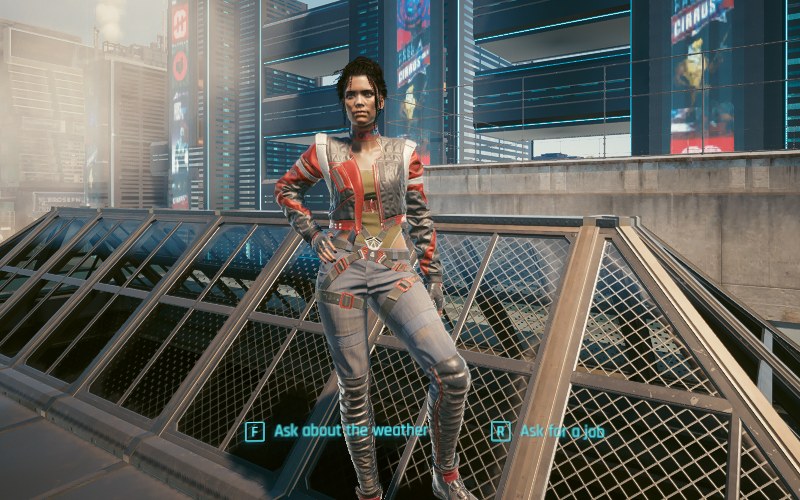
-
A hub: the player scrolls to a choice and picks it with F. Choices can be highlighted as quest-important or dimmed as already picked
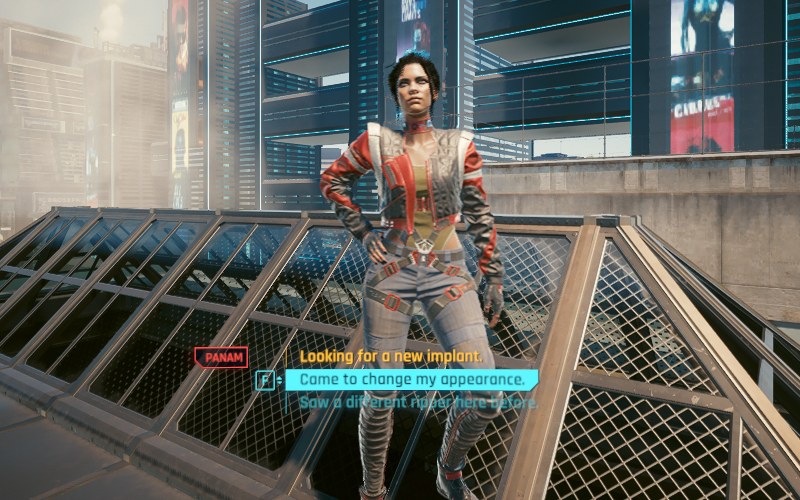
Interactions are client realm API. The server doesn't know about them. To act on a choice on the server, send a net event from the callback.
Attaching an interaction to an entity
Attach puts an interaction on an entity, an NPC, a device, a vehicle or any
other game object. It follows the entity as it moves, and the entity's own
interactions are not affected.
ulong? interaction = re.Interactions.Attach(
    npc,
    [new("Ask about the weather"), new("Ask for a job")],
    selection =>
    {
        // selection.Choice is the index into the choices
        if (selection.Choice == 1)
        {
            re.Events.EmitNet(new JobRequest());
        }
    }
);

if (interaction is null)
{
    return; // the reason is in the client log
}
- The callback receives an
InteractionSelectioncontaining theInteractionhandle, theEntityit is attached to and theChoiceindex Attachreturnsnullinstead of throwing when it can't create the interaction. It fails when the entity doesn't exist or isn't a game object, when it already has a prompt, or when there are no choices- When the entity despawns, the interaction is removed and the optional
onLostcallback runs. Interactions are also removed when the bundle unloads
Options
Pass an InteractionOptions to pick the style and when the interaction is
available:
re.Interactions.Attach(
    npc,
    choices,
    OnSelected,
    new re.InteractionOptions
    {
        Style = re.InteractionStyle.Hub,
        Title = "PANAM",
        Radius = 3.0f,
        LookAt = true,
    },
    onLost: () => Console.WriteLine("NPC is gone")
);
| Option | Default | |
|---|---|---|
Style |
Prompt |
Prompt or Hub |
Title |
empty | Shown next to a hub's choices. Unused by prompts |
Radius |
3 |
Distance in metres between the camera and the entity's origin |
| within which the interaction is available | ||
LookAt |
true |
Also require the player to look at the entity |
Choices
Each choice is an InteractionChoice:
re.InteractionChoice[] choices =
[
    new("Looking for a new implant.", QuestImportant: true),
    new("Came to change my appearance."),
    new("Saw a different ripper here before.", AlreadyRead: true),
];
Captionis shown as written. A localization key likeLocKey#12345is shown in the player's languageQuestImportanthighlights the choice in yellow,AlreadyReaddims it like a dialogue line the player picked before,Inactiveshows it as unavailable. The highlight and dimming only show in hubs- A prompt binds its choices to the game's dialogue keys in order (F, R, 1, ...). Keep it to a few choices, use a hub for longer lists
SetChoices replaces the choices while the interaction is on screen. A
common use is dimming a choice once it was picked:
void OnSelected(re.InteractionSelection selection)
{
    choices[selection.Choice] = choices[selection.Choice] with { AlreadyRead = true };
    re.Interactions.SetChoices(selection.Interaction, choices);
}
Placing an interaction in the world
Place puts an interaction at a position instead of on an entity, for
example a terminal that isn't a real device, or a spot on the floor:
ulong? terminal = re.Interactions.Place(
    new Vector3(-1234.5f, 567.8f, 12.0f),
    [new("Use terminal")],
    selection => OpenTerminal(),
    new re.InteractionOptions { LookAt = false }
);
- An invisible entity is spawned at the position to own the interaction and
despawned with it.
InteractionSelection.Entityis that entity - Use
LookAt = falseunless the player should look at the exact point.Placedefaults to it when no options are passed onLostruns when the entity could not be spawned
Removing an interaction
Remove returns false when the handle is unknown, for example because the
entity already despawned or the interaction belongs to another bundle.
What the player sees when interactions overlap
The game shows interactions by rules that also apply to yours:
- Only one prompt is visible at a time. When the player is in range of several prompts, the one added first is shown, even when another is closer
- An active hub hides prompts in range. This includes prompts on other entities nearby
- Hubs stack. Several hubs in range show as one list, and the player scrolls through all of them
- An entity can have one prompt. A second one would never be visible, so
Attachrefuses it. Put more choices into the same prompt, or use a hub
If two bundles both add prompts to the same area, only one of them is visible. Prefer hubs for interactions that should coexist with others.